
Today we are releasing another major update to Flipatic. This one is strongly focused on editorial control, smoother work with video materials and more flexibility for newsrooms, marketing teams and sales departments using Flipatic in their daily work.
Fact-checking for video scripts
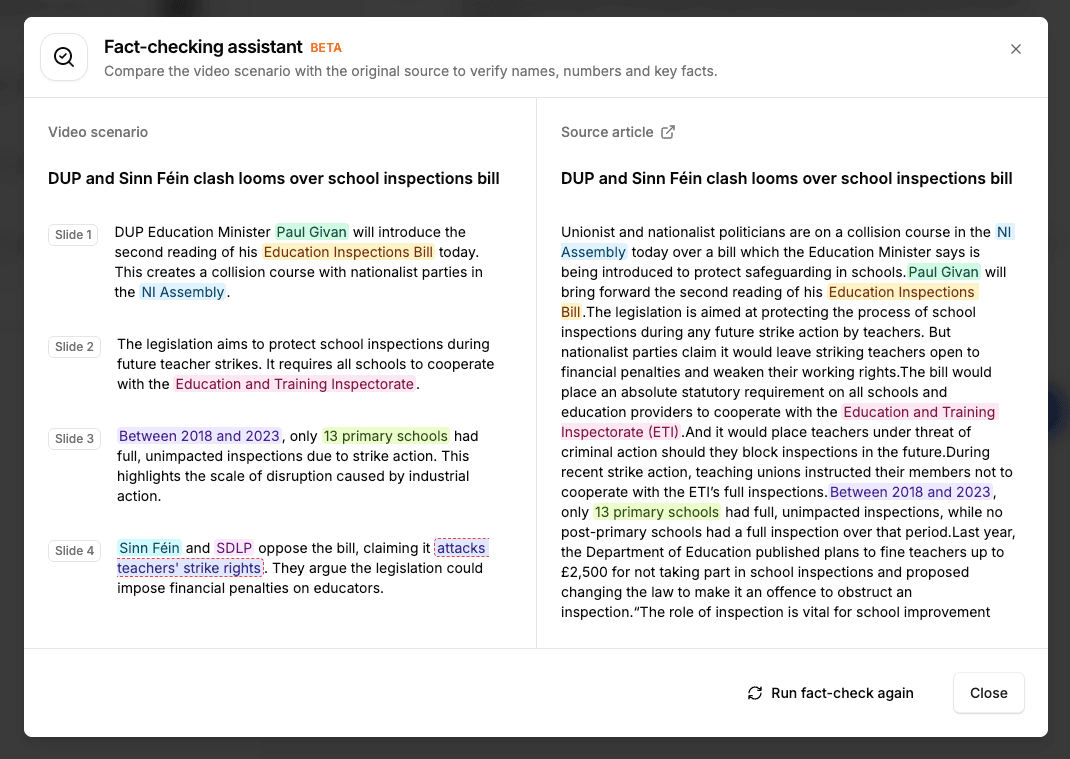
The biggest change in this release is the introduction of fact-checking.
We have seen many times how journalists working in Flipatic open the original article next to the generated video script to check whether key facts have been preserved correctly. Numbers, names, places, dates, quotes or other factual details often need to be verified before the video can be approved.
We decided to support this workflow directly in the product.
The new fact-checking view displays the source article and the Flipatic video script side by side. Important facts are highlighted in the script, and when the journalist hovers over a selected fact, Flipatic shows the matching fragment from the source article.
This makes it much easier to check, word by word, whether a given piece of information is present in the original article and whether it has been represented correctly in the video script.
The goal is simple: to give editors more confidence and make the approval process faster, safer and more transparent.
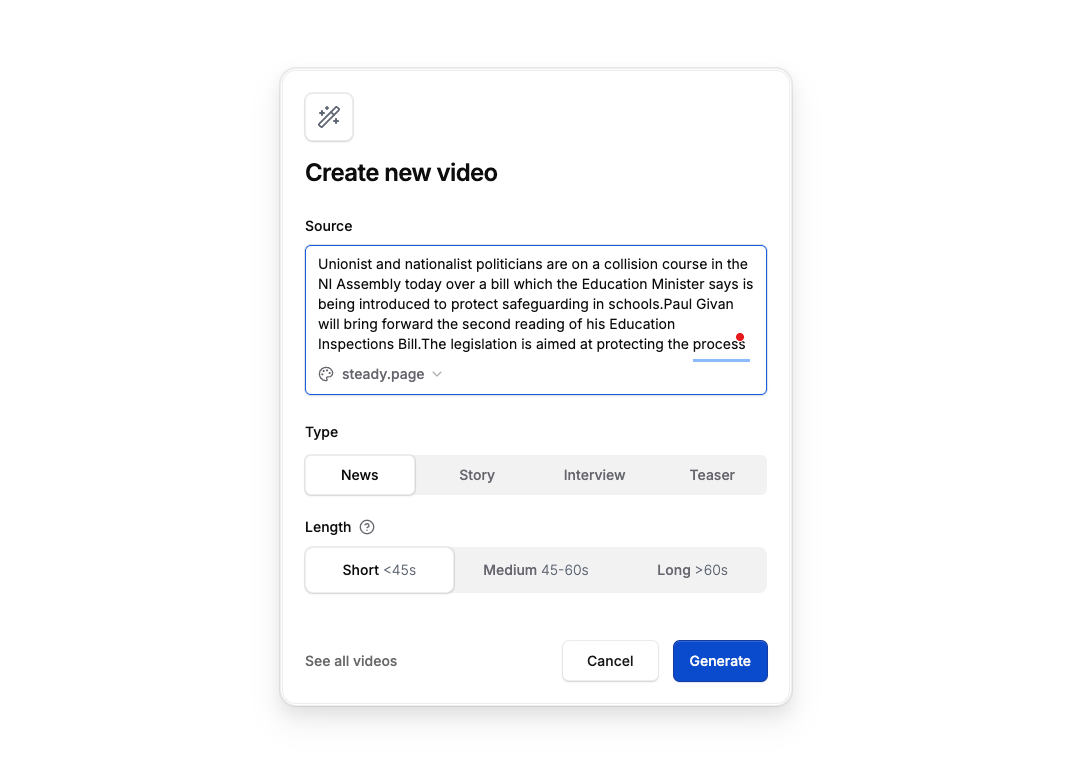
Create videos from pasted text
Until now, videos in Flipatic were usually created from article URLs. The article had to be published first, then Flipatic imported it and turned it into a video.
From now on, this is no longer the only option.
Journalists can now paste text directly into Flipatic and generate a video from it. This means that the source material does not need to be published online yet. It can be an unpublished article draft, a piece of internal editorial material, content from a print edition or any other text that the newsroom wants to turn into a short video.
This gives editorial teams more flexibility and allows them to create videos earlier in the publishing process.
Video trimming
We are seeing more and more video clips being used inside Flipatic projects. Not only photos and article images, but also short video fragments.
To make working with these clips easier, we have added video trimming.
Editors can now visually select where a video clip should start and where it should end. The trimming interface uses a simple timeline-like view with video frames, making it easy to choose the exact fragment that should be used in the final video.
This should make everyday editing faster, especially when the source clip contains only a few seconds that are relevant for the story.
Upload custom logo and music assets
More advertising and sales teams are now using Flipatic to create branded content for commercial partners.
To support this, we have added the option to upload two custom assets: a logo and music.
This means that videos created for advertisers can now better reflect the style and character of a specific brand, instead of relying only on the publisher’s standard video template.
For branded content, sponsored articles and commercial video formats, this gives teams more control and more room to adapt the final video to the advertiser’s identity.
Automatic import of image sources
Many images used by publishers include source information, such as the agency, photographer, stock provider or author.
Flipatic now imports this information automatically and places it directly in the source field.
This removes another small manual task from the journalist’s workflow. Instead of copying and pasting source data by hand, the editor gets it imported together with the image whenever the information is available.
Smoother drag and drop experience
We have also improved the drag and drop experience inside the video editor.
Moving slides, rearranging backgrounds within a slide and moving backgrounds between slides should now feel much smoother and more predictable.
This is one of those updates that may sound small, but matters a lot in daily work. When editors adjust the structure of a video, the interface should simply respond well and stay out of the way. This release brings us much closer to that experience.
Import videos from Facebook posts
Flipatic can now import videos from Facebook posts.
This extends our existing social media import options, which already included sources such as X and Instagram. If a Facebook post contains a video, Flipatic can now extract it and make it available inside the project.
For publishers who already use social media video materials as part of their editorial workflow, this makes it easier to bring those assets into Flipatic without extra manual steps.
New image sources: Unsplash and ANP
We are also expanding the available image integrations.
Unsplash has been added as another free image source, next to Pexels. This gives newsrooms a broader set of visual materials that can be used when creating videos.
We have also added an ANP integration for the Dutch market. This integration was built for a client with a dedicated licence agreement with that image provider.
In addition to new sources, we have improved how image search works in Flipatic. The results now include pagination, so users can browse deeper into the available images. We have also added sorting options, including sorting by relevance or by newest results.
Better organised video settings
Over time, the global video settings in Flipatic have grown significantly.
This was a good sign from a product perspective, because it meant we were giving teams more control. But it also made the settings panel harder to use.
In this release, we have reorganised the settings into logical groups and introduced tabs. This should make it easier for editors to find the option they need at a given moment, without scrolling through one long list of controls.
Four new titles added to Flipatic
Finally, four new publisher titles have joined Flipatic in this update: two from Ireland, one from Belgium and one from the Netherlands.
This is another step in Flipatic’s growth across European newsrooms and another signal that short-form video is becoming a regular part of editorial publishing workflows.